
Smart quote from a description
Updated on 26/11/2026
In short
Describe the job in words, or just say it, and TEKANGO builds a draft with lines and quantities. You fill in your own price on every line, change what you need, and save.
- No typing line after line
- Speak instead of typing
- The price is always yours, not the AI's
- Nothing reaches the client until you send it
Three steps
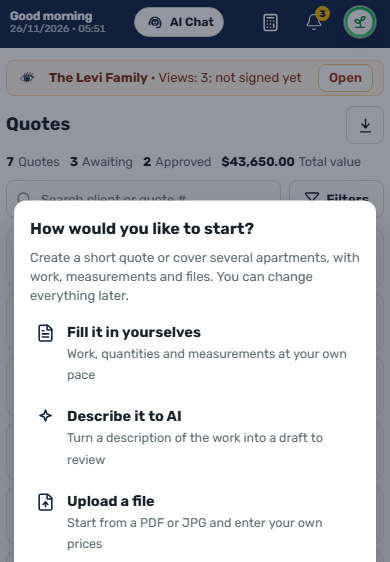
Choose "Describe it to AI"
In a new quote, on the "How would you like to start?" screen.
Describe it and check the draft
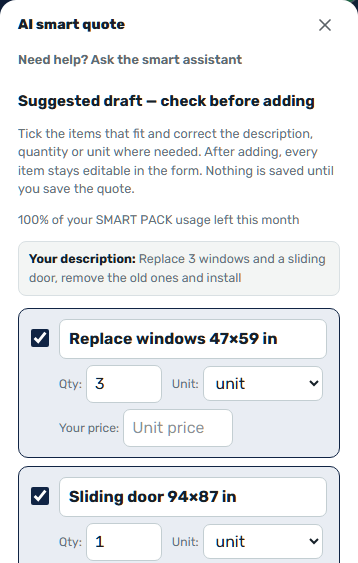
Type or say it, e.g. "Replace 3 windows and a sliding door, remove the old ones and install". Tick the lines that fit and fill in your price.
Add to the quote and save
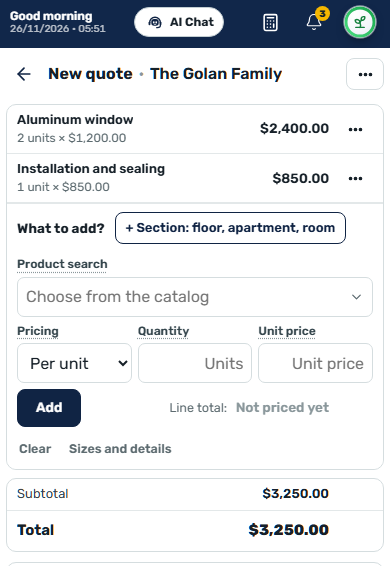
The lines go into the quote editor. Change what you need, then save or send it to the client.
Frequently asked questions
Does the AI set the prices?
No. The AI suggests lines and quantities, and you fill in your own price on every line.
Can I speak instead of typing?
Yes. Tap the microphone and say the job.
What if the draft is not accurate?
Tick only the lines that fit, and delete or fix the rest in the editor. You can also tap "Different description" and try again.
Does the client see the draft?
No. The client gets the quote only when you send it.
How much does it cost?
The smart quote is part of SMART PACK, an optional add-on: $5 a month, or $51 a year with a yearly plan. It is included during the 7 free days. The window shows how many percent of this month's usage you have left.
Want to try it?
Open a free account and make your first quote.